Wednesday, March 26, 2014

Reflection on This Past Week

This weeks readings:
  
      This week's readings were very interesting, in my opinion. Particularly the reading on discrimination in online ad delivery. Both of these topics were things I have never really thought about before and they were mind opening. I never thought that there was discrimination in online ad delivery, even though thinking about it now it makes sense. Overall, I enjoyed reading both of the papers and I found them both engaging and fun.

Tuesday, March 4, 2014

BUS572- 4

Concept: You Can't Eat These Technological Cookies

     One of this week's new concepts involves technological cookies: What they are, how they work, and how you can optimize them to your specifications. According to the lecture provided by the Google Online Marketing Challenge, cookies come in multiple forms but most consistently they are used to store information about a specific user on a website or web service such as email or online shopping. The Visitor Identifier Cookie provides each unique browser that visits a site a unique ID and this ID is present across all sessions in the same browser. This type of cookie expires every 2 years, if not deleted first. The Session Identifier Cookie determines the beginning and the end of a session and expires after 30 minutes of inactivity from a user and is then deleted from the browser. The Traffic Source Identifier Cookie stores the traffic source information for the session, so essentially it stores information about where each visitor is coming from. This cookie is stored for 6 months or until it is overwritten by a new traffic source. Finally, the Custom Visitor Segmentation Cookie allows you to define your own segments for reporting such as a segment of visitors to your website which fall into a certain desired demographic. This cookie expires 2 years after it's last update. Knowing the types of cookies used to store information, or how you can utilize cookies to collect information about traffic to your website, can play a very important role in refining your advertising. If you see that over half of your website traffic is coming from one website, you can choose to spend more of you advertising budget on that website to continue increasing traffic. The one thing that needs clarification to me about cookies is if it is possible to get any data from people who have their cookies disabled. I know this is a function that is available on all computers, however if someone has their cookies disabled, is there any information that website users can still obtain from the visitor?


Concept: How Google Analytics Works

Google Analytics is a service offered by Google that can be enacted on any website that chooses to utilize the service. In essence, webmasters are able to collect data about where their web traffic is coming from, what hours of the day their website is most visited, and many other areas which are extremely important to improving their website traffic and visibility numbers. There are multiple steps which illustrate how Google Analytics works:

1) Your website loads on any device
2) The Google Analytics Javascript begins to fire
3) The first-party Google Analytics cookies are read from and/or written into the browser by the Javascript code
4) A GIF request is created and sent to the Google servers
5) Data is sent to Google's servers
6) Data is processed and pre-aggregated
7) Data is made available in the user interface or through the API

These steps are critical in understanding the background processes happening when you are looking at the data collected by the Google Analytics process. Without knowing how Google Analytics is working, it is difficult to trust the data and numbers you are presented with when you are analyzing data. This way, you can be assured that Google Analytics is working in the background just as you would hope it would be. In terms of using Google Analytics, I would be curious to see how many webmasters are actually utilizing it's functions and are able to make changes to their website according to what the analysis showed.

Skill Set: Using the Google Search & Display Networks for your Campaign

     Using the Air Jordan case study provided by Google, it becomes quite apparent just how useful knowing how to properly use Google Search and Google Display Networks can be for campaign success. In this example, the Air Jordan marketers realized that they needed a new spin on their traditional flashy tv marketing ads. They came up with Leroy Smith, the boy who took Michael Jordan's spot on the varsity basketball team in high school. Jordan attributed that moment to the first time he realized how much harder he needed to work in order to make it into the professional arena of the sport. audience. Played by actor Charlie Murphy, the campaign’s Leroy sold motivational DVD that promised to teach viewers the same skills he used to dominate Michael Jordan. The DVDs, along with posters, an iPhone app, and music videos can be found on his site, www.getyourbasketballon.com. And of course the campaign’s Leroy also has a YouTube Channel, a Facebook profile, and a Twitter feed to communicate with his fans. By using keyword targeting to automatically place their ads on highly relevant sites on the Google Display Network, the team was able to find the right locations for their creative more quickly and efficiently than if they had sought out the sites individually. This proves how important it is to have a working knowledge of the Google Search and Google Display networks. My question is how much trial and error it took for the marketers to find the sweet spot of exactly where they should be marketing.

In the Future: I'm Ready to Start the GOMC

     Honestly, all of this buildup before we can actually start the Google Online Marketing Challenge is starting to drain me. I am ready to start putting everything we have learned into practice and see how well my team can do in terms of increased website traffic for our client. This whole semester has been a challenge since all of these concepts have been so new. But overall I am learning a great deal and I am excited to really put all of these skills into action!
     

Wednesday, February 19, 2014

BUS572-3

Concept: Knowing When the Keyword is the Right Keyword

     There are four things to consider when choosing a keyword: Search volume; Competition; Propensity to Convert; and Value per Conversion. Each of these concepts gives an important aspect to finding the right keyword. Search volume is how many searchers are using that phrase to find what they want. Competition is how many other web sites out there are targeting that same phrase. Propensity to Convert is the likelihood that the searcher using that key phrase is going to convert on your site. And Value per Conversion is the average value per prospect attracted by the keyword. Without each of these concepts being taken into consideration, there is the potential for a keyword to perform less than expected. To give an example of how this works, say you were looking to set up an advertisement for red stilettos and one of the keyword phrases you wanted to use was 'red pumps'. Search volume would tell you how many people are searching for red pumps, competition would tell you how many other web sites are using that same phrase to attract customers to their sites, propensity to convert tells you the likelihood that a searcher is going to choose your site to look at, and value per conversion is the average value that the keyword is likely to bring to the advertiser. While all of these tools are valuable to writing your keywords, the book does not tell readers how to access this sort of information. Some of these values can be found by using Google Insight, but where do you find the others? Are these four keyword concepts weighted? Meaning is one of them more important than the others, so it should be more of a focus?

Concept: Optimizing Images

     Search engines cannot see what an image is depicting, therefore the search engine relies on keyword descriptors to determine when an image is relevant to a search. Advertisers should optimize their images with keywords in order to ensure that they can be shown when a searcher inputs a relevant keyword in the ad outputs. Using good descriptors for images is also helpful for screen readers which read the image description to visually impaired users. There are several ways advertisers can optimize their images such as: 
  • Use descriptive file names.
  • Use specific alt tags and title attributes for the images.
  • Meta information can be supplied in the image file. Make sure this information is relevant.
  • Use descriptive captions, and keep relevant copy close to the relevant image.
  • Make sure the header tags and images are relevant to each other.
Example of Optimizing an Image Through Keywords:


I wish the book went further into detailing exactly how specific your keywords should be for your image. For example, should it just be a one sentence description, or should it be multiple keywords strung together that all describe the image? It is obvious that it is very helpful to optimize your images for searches, however I am curious for more details

Skill set: Creating Worthy Website Links

     The search engine algorithm determines the relevancy of the referring web site to the site being linked to. By analyzing various things, the engines try to determine if the links are natural links or if they are manipulative, artificial links created solely for ranking purposes. Manipulated links are worth very little compared to natural links and may lead to a drop in search engine rankings. Some sites are more relevant than others to specific terms. The more relevant a site, the more value is transferred by the link. Well-known and established news sites, government sites (.gov), and university domains (.edu) are examples of sites from which links can carry more weight. Knowing how to create links that are more trusted and therefore carry more weight is an essential skill set to any advertiser looking to increase the relevancy of their website. One important way that advertisers can see who is linking to their website versus a competitors through a noncompeting site is by using a free service offered by Site Explorer. This website allows you to see which noncompeting sites are ranking highly for your key phrases. A question that arises is what to do with the information once you have it. If you see that your website is not ranking as highly as a competitors on a specific noncompeting site, how do you go about changing your ranking? Can you adjust your link and keywords and see if that makes a difference? How long should you continue this sort of testing for? I can see how important it would be to know where your website is being linked to often, but how do you go about making corrections for other sites that you would like to rank higher with?

Overall: Search Engine Optimization Keeps Getting More Complicated
     This week definitely added some new fine details to my knowledge of search engine optimization. Most of this information is extremely helpful and I can understand how and when to use the various skills and concepts presented. There were a few times however, like those I spoke of above, where I felt like I was not sure how to implement or interpret some of the skills I was taught. I am hoping in the upcoming weeks to gain some further clarification about how to utilize some of these concepts and skills to the fullest extent. Overall though, I have been able to make massive improvements to my understanding of eMarketing and I am excited to continue learning new skills and refining those I have already acquired.

Monday, February 3, 2014

BUS572 - 2

Concept: The Making of Funnel Vision.

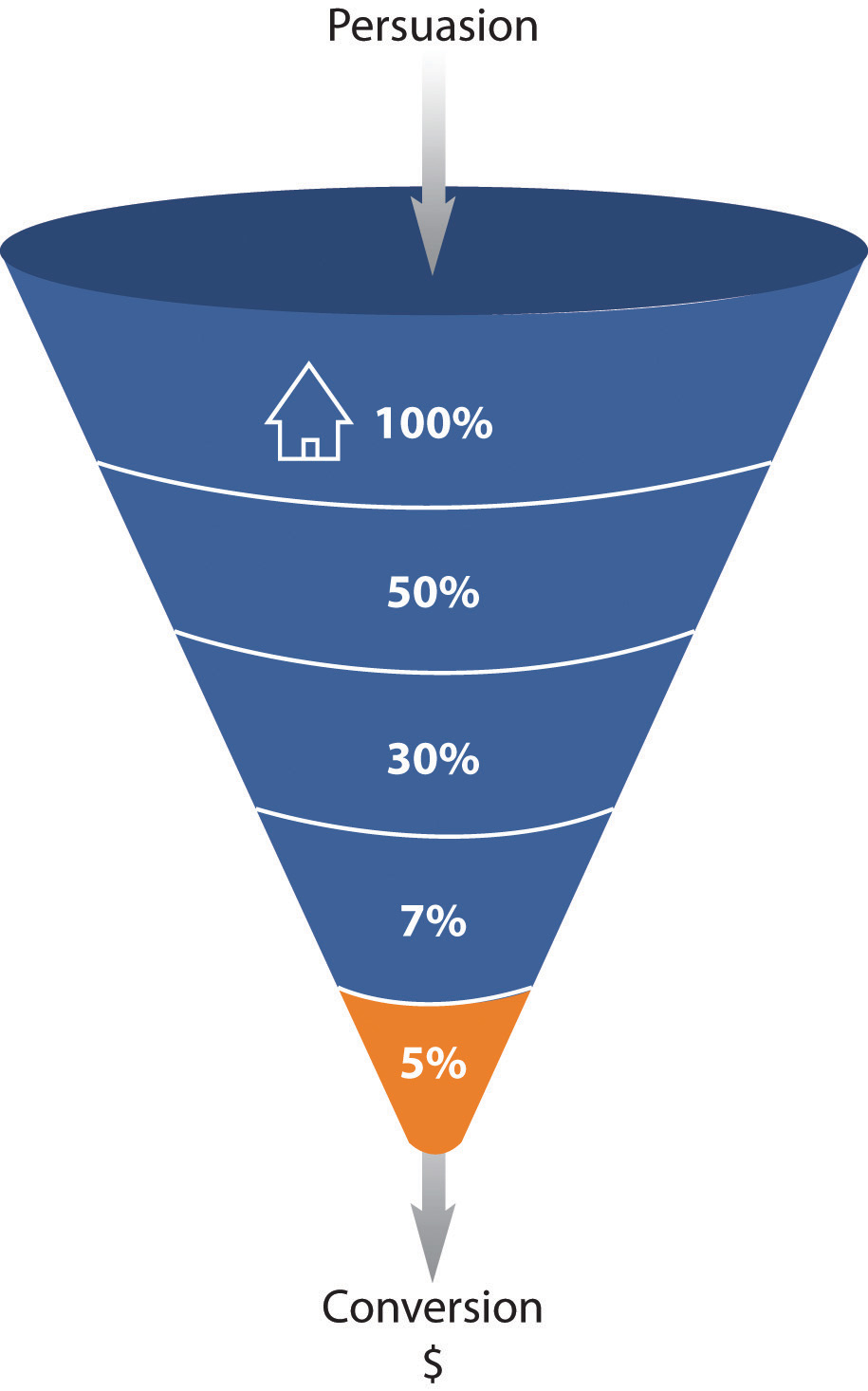
     Week 2's readings brought us more detail about how exactly you can optimize your website and increase your click-through rate (aka increase the amount of people buying stuff from you!). With this optimization comes funnel vision. In reality, it's called funnel analysis, however funnel vision has a nice ring to it... In essence, funnel analysis breaks down the path that visitors should take to reach the final objective and analyzes events according to conversion rate to show you which steps you are losing the most potential customers on. This is very useful to website owners because if you can isolate where exactly in the click-through process you are losing a customer's interest, and why you are losing their interest, you can work to optimize your website and improve the number of customers continuing on to the next step. An example of how this all works:

Lets say you own a small business which specializes in hand-painted pictures. Your ultimate goal is to get customers to purchase your pictures with their credit card.

Event 1: Perform a search for custom artwork and find your website
Event 2: Check out the available pieces and their prices
Event 3: Select the piece you would like to purchase and go to check-out
Event 4: Enter your credit card information and shipping details and confirm purchase (conversion)

You expect fewer people at each event step; that's why it's called a funnel. If you are able to increase the number of customers flowing through each step, you will be able to increase your conversion rate and ultimately increase your sales. The question that arises from the use of this funnel is what to do with the information. If you have 2 steps, for example, where you are losing a significant portion of your potential customers, which step is the most important to fix first? Is it possible to get an extremely high (respectively) click-through rate if you 'fix' your funnel?

Illustration of Funnel Analysis and Conversion Rate (Source: eMarketing Text)

Concept: Websites Know Where You're Coming From (Like, Geographically.)
     This week's readings also talked about visit characterization, which in essence are terms and concepts that help website advertisers figure out where their customers are coming from. This knowledge allows advertisers to see if more customers are coming from search engine sites like Google or being linked to the website from other websites carrying similar products, etc. Knowing this allows them to put their advertising resources where they will have maximum potential to reach customers. There are two key visit characterization groupings with several terms that are important including (Group 1) Entry Page, Landing Page, and Exit Page and (Group 2) Internal Referrer, External Referrer, Search Referrer, Visit Referrer, and Original Referrer. 

Group 1:

Entry page. The first page of a visit.
Landing page. The page intended to identify the beginning of the user experience resulting from a defined marketing effort.
Exit page. The last page of a visit.
Visit duration. The length of time in a session.

Group 2:

Internal referrer. A URL that is part of the same Web site.
External referrer. A URL that is outside of the Web site.
Search referrer. The URL has been generated by a search function.
Visit referrer. The URL that originated a particular visit.
Original referrer. The URL that sent a new visitor to the Web site.
(Source: eMarketing Text)

     How marketers decide to use this knowledge is up to them, however questions remain about what to do with the knowledge. If you find that most of the visitors to your website are coming from Google, do you spend more advertising money there because you already have a customer base coming from the source, or do you focus more of your resources on outlets where you do not have a lot of traffic coming from?

Skillset: A/B Split Testing to See Where You're Going Wrong

     It becomes important as you're progressing through your ad campaigns to see where you start going wrong, and see which text group is more effective at increasing your conversion rate. While A/B Split Testing takes more time, I also believe it to be the most effective method for determining which advertisement phrases are more effective. A/B split testing measures one variable at a time to determine its effect on an outcome. Different versions are created for the variable you want to test and all other elements on the Web page, in the e-mail, or part of the PPC advertisement remain the same. The results are then interpreted to see if there is a statistically significant difference between the variables. The version producing the best results can then be employed. To give an example of this, say again you were trying to advertise your hand painted pictures. You create two (or more, it just takes more time with more) email subject headlines and keep the entire body of the email exactly the same. Sending out the first email with subject headline #1 will give you data on the first subject lines open rate, and then sending out the second email with subject headline #2 will give you data on the second subject line open rate. Once all the potential headlines have been sent out (over time) you can then compare the open rates for all of the various subject headlines to determine which was the most effective at getting people to open the email. This will allow you to hone in one what will encourage potential customers to open the emails you send more often, potentially increasing both your open rate as well as your conversion rate and your sales. A main question for A/B Split Testing though is how long you should give between testing variables A and B. The book does not mention a time frame for the tests, but I would imagine it needs to be on the shorter end to ensure timely delivery of an advertisement.

The Next Steps in eMarketing

     We went into much greater detail this week about the complications of eMarketing, and how marketers figure out where their advertising is going astray. This is extremely important because marketers need to know how to fix mistakes and continue to improve upon campaigns. While it is rewarding to be able to know when and where you need to make changes in your campaigns, this also presents a lot of challenges, some of which I don't feel were adequately addressed in the text. I felt like the text focused on telling readers how to figure out if something was not functioning as you had imagined it would in your campaigns, however it did not guide you as to fixing the problem. For example, if I found that one email headline worked better than another with my A/B Split Testing, would I stop trying different headlines and only use ones like the best one of the two tested? Or should I keep trying new ones? What is considered a successful click-through rate or a successful email open rate? Overall, I did learn a lot on the process of fixing mistakes in campaigns this week, and I am looking forward to perhaps getting some of the details which I feel the book left out or learning even more techniques on the best way to capture a wide market.

Tuesday, January 14, 2014

BUS572 - 1

Concept 1: Search engines are craftier than they appear.

     This week's readings covered the basics of eMarketing and how both search engines as well as pay-per-click advertising function within an overall online marketing strategy. One of the first subjects covered in chapter 5 was the concept of how a search engine actually works, something which I feel is very important yet not very well understood by the general public. So much of what happens online involves search engines and the utilization of the results they show you, thereby proving why knowing how the search engine functions is such an important thing. For example, you want to find a local dog groomer. Instead of using the phone book like you would have 20 years ago, you go online and type 'dog groomer in Pittsburgh, PA' into Google's search bar. The results you see are the result of the search engine's algorithms and will help you to select a new dog groomer. A search engine is comprised of four separate parts: The Spider, the Index, the Engine, and the Search Engine Results Page or SERP. The spider is an automated bot which goes from page to page, following links and recording what it finds; the index is the library of information that the spider creates; the engine is the part that does the actual searching by checking the index and giving the user the most relevant pages that it finds; and the SERP is the ordered list of results for the user's query. Knowing how the search engine works is important because it allows a marketer to understand the types of keywords and other searchable phrases that will be helpful in making a website more 'search engine friendly'.  Without this knowledge, e-marketers may be focusing on the wrong keywords and may end up with unfavorable results. A key question though is what more does an e-marketer need to know before they can successfully create keywords for an online search. It is one thing to understand how a search engine works, but is it the only thing? A side-note personal question: Where is the index stored? At some point the index must become massive; how do search engine websites handle so much data?

Illustration of a Search Engine (source: FoodieSEO)

(FUN FUN!)
Moz is a blogger who teaches about technology in a way I can appreciate: by being funny. Linked below is his blog about a conversation with his mom about how she thinks search engines work. I have to admit I answered like mom did until this past week!


Concept 2: Your keyword searches are someone else's brilliant idea already

     A second concept brought up in this week's readings is the idea of match types in pay-per-click advertising. In general, there are 4 main match types: The Broad Match; Phrase Match; Exact Match; and Negative Match. Match types allow an e-marketer to be either very specific or very general about when their advertisements will appear in a search through the keywords they use. According to our eMarketing textbook, a broad match means that your advertisement will appear for the keywords you have entered, as well as search terms that contain your keywords and any other words in any order, as well as some variations of your keywords (misspellings and synonyms). A phrase match,which is denoted with quotation marks around the keywords (“phrase match”) means that your advertisement will appear only for search terms that have your keywords in them, in the same order, though other words may also be in the search term. An exact match, which is denoted by square brackets ([exact match]), means that the advertisement will only appear for search terms exactly the same as the keywords selected. And finally, a negative match, which is denoted by using a dash in front of the keywords (-negative), means that your advertisement will not appear in searches using that word, no matter what other words are used.
     To give an example of the four match types, say you were an advertiser for blue coffee cups and you wanted to direct the search engine about when you want a users search to bring up your website and when you don't. If you used a broad match type, any user typing in any variation of 'blue coffee cup', including misspellings and synonyms, would see your page as a potential result. Using a phrase match, users would specifically have to type in "blue coffee cup" to see your page as a result, however extra words may be added such as "shatter-resistant blue coffee cup". With an exact match, only users typing in the exact phrase [blue coffee cup] will see your page as a search result. And finally, in a negative match you can set the preference to have anyone searching for red coffee cups not show your page in the results by typing '-red' into the keywords selection. Utilizing match types allows advertisers in a pay-per-click advertising system to control how many potential clicks result from searches. Match types also allow advertisers to ensure that the quality of clicks they are getting on their advertisements from a search engine are accurate and guided in order to ensure that the advertiser is not paying unnecessarily for unwanted or unwarranted clicks. Along this line, I would be curious to see if there were limits to the amount of match typing an advertiser could implement. Is it possible to restrict keyword searches too much? Besides simple trial-and-error which can be a laborious and time-consuming process, are there any other ways to see which match types work for your advertisements and which need to be revised?

Illustration of Match Types (source: Convertiv)

Skill Set 1: The tactics and flexibility behind various marketing strategies.

     Having no real eMarketing skills before now, the last chapter we read this week on strategy was a really important and fundamental skill set to capture. The chapter introduced us to the various outcomes a marketer can expect when using different marketing techniques, and the skills required to determine which type of marketing were most appropriate to achieve your desired outcome. Such a skill set is vital if an advertiser wants to accomplish their desired goal and increase both visits to their website as well as products sold. For example, if you were interested in branding your product, as an advertiser you would focus more heavily on online advertising and social media. If you wanted to obtain new customers however, you would want to focus more on search engine optimization and email marketing. Without having the skill set to determine which route of marketing is best for your product, you may be spending valuable resources expanding into an area which that goal is not linked to. This chapter taught about flexibility in marketing as well. Not only do you need to know which type of marketing is best for your desired outcome, but you also need to have flexibility in your pursuits to know when changes need to be made and what type of changes are necessary. In the end, it will take a decent bit of trial-and-error before you figure out which marketing techniques work for your business and which don't. I would be interested to know how many of the techniques overlap in their defined outcomes and if using more than one technique, for example for branding your product, would be more effective.

Illustration of Tactics and Outcomes (source: eMarketing Textbook)

Reflection: Where is this emarketing journey heading?

     So far my journey into eMarketing has been pleasant. I have already learned many new skills and I finally have an understanding of how Google works! (As a graduate student I would say it's about time.) It has been very rewarding to learn about concepts and skills that I utilize every day without ever realizing, particularly in terms of how advertising works and how my keywords get me to the pages I'm looking for. However I still struggle with the vastness of search engines and the idea that all of this information isn't sitting in hard copy somewhere in a far off library. I am excited to continue learning about the subject and to begin putting my skills into practice: I have a good idea of the strategies my team needs to employ for our marketing campaign and a good idea of the most effective ways of implementing that strategy. My goals for next session are simply to continue learning the subject and expanding upon the knowledge that I have learned here.